Important improvements are grouped by period: new features, fixes and useful workshop points. The goal is simple: quickly understand what changes in the software.
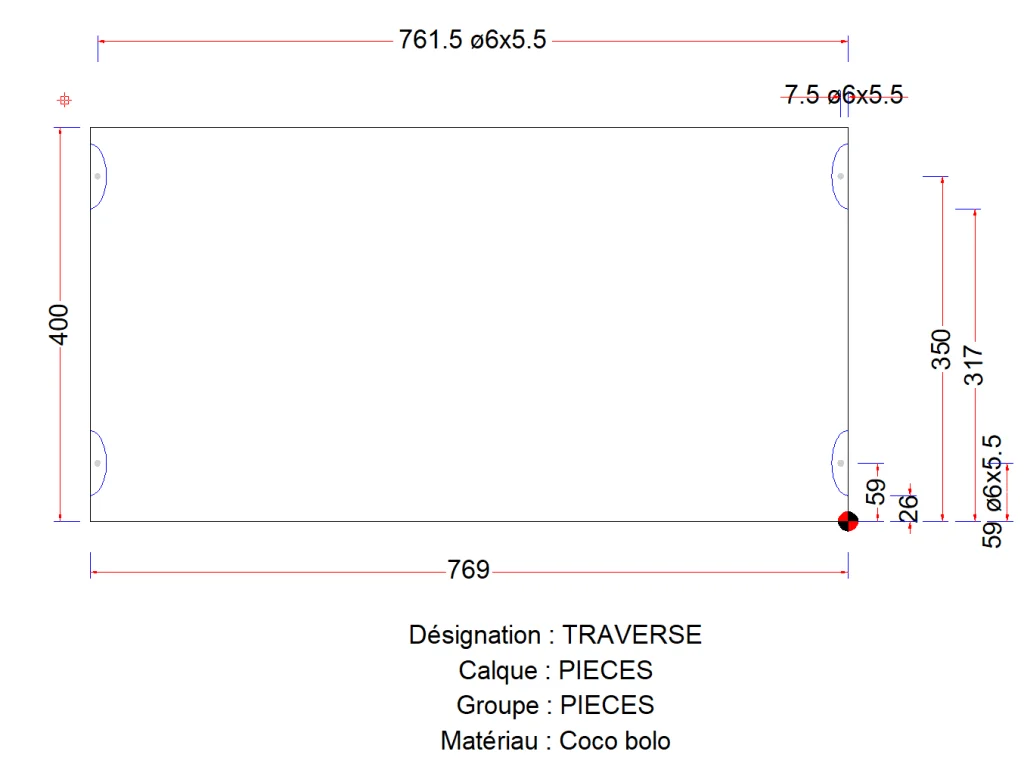
Added: detailed dimensions in the Part plan view for Lamello.
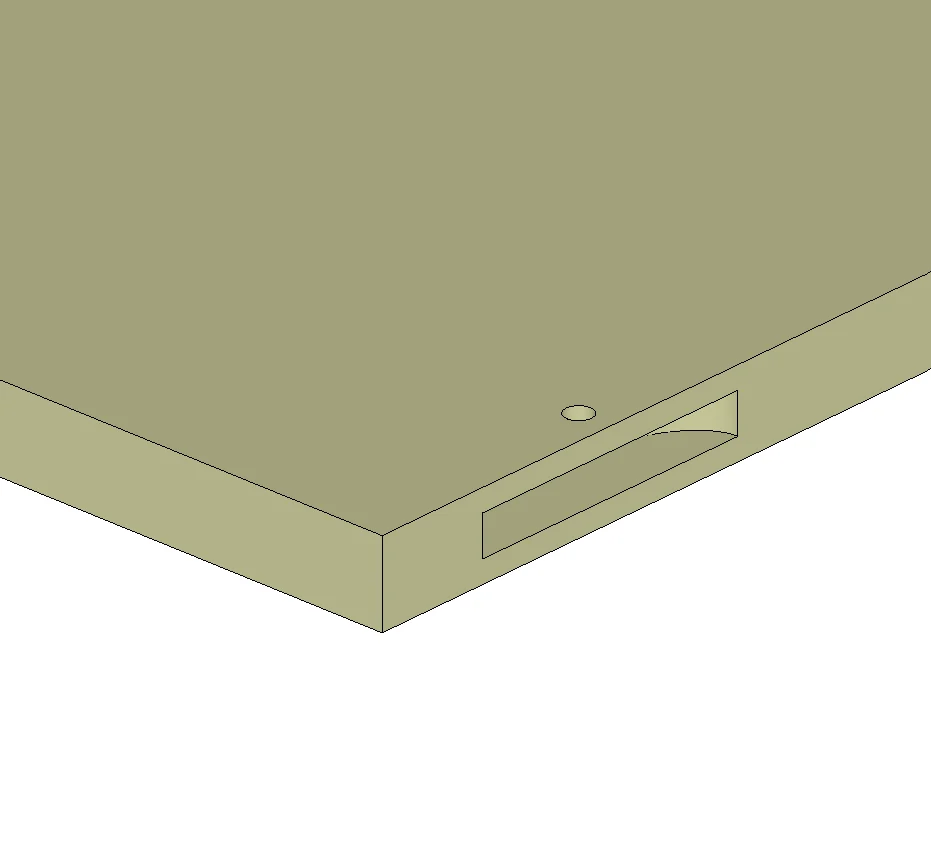
Added: new Lamello feature.
Management of wood Lamello, metal Lamello, Clamex S18/S20, P10/P14 (CNC, FLEXUS, MEDIUS), P18 and Divario.
Management of machining connections with neighboring parts sharing the same edge or connected perpendicularly.
Integration in the Part plan view.
Export as sub-programs in the CNC export, including tested MPR Homag output.
Added: recovery when creating a new document. If document1.al~ already exists, the user is offered the option to recover it.
Added: error message when the user settings folder no longer exists.
Added icons to the relation context menu.
Added: edge mirroring relative to a face, useful for revolved handles when part symmetry fails.
Changed: removed the message displayed when writing CNC text files.
Fixes
Fixed: crash when selecting multiple vertices.
Fixed: some data was no longer visible, for example Transformation for DWG imports and cost details when adding a quantity.
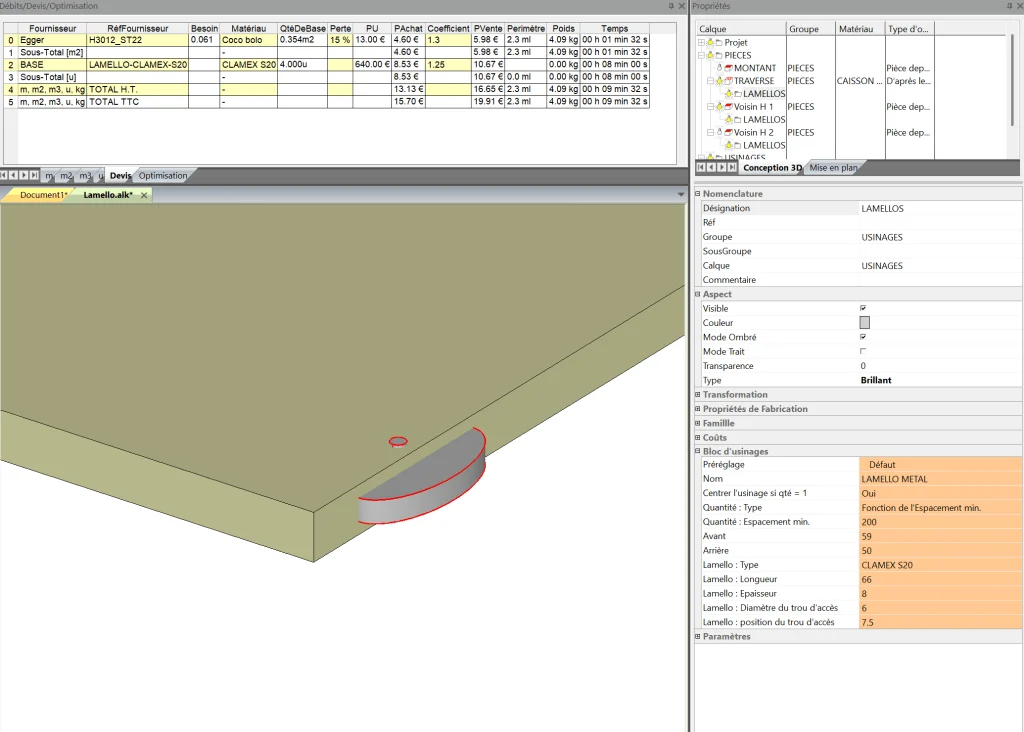
Lamello and Clamex assembly with allowance in Aleker Designer Automatic Lamello position dimensions in Aleker Designer Lamello machining on a panel edge
2025-12-07 Version 2025-12-07
Improvements
Added: positioning name list in Volume for 3D copy/paste to guide new users.
Added: auto-suggestion in the properties box, for object nomenclature only.
Added: detection of the edge closest to the mouse when creating a part from edges detected on a face.
Changed: Volume for 3D copy/paste now copies the parent dimension by default.
Added: first version of part from edges detected on a face, a function that can make some parts much faster to draw.
Added: checkbox in the Cut lists tab to show the list again after it has been hidden.
Fixes
Fixed: photorealistic rendering did not work because of a window-size multiple issue with 16, producing blurred output.
2025-10-05 Version 2025-10-05
Improvements
Exploded view improved with slider control in the ribbon.
Added: ability to define a part from an arc curve (arc plus one edge). Useful for fast designs such as a curved counter front.
Added: user setting for default thickness on curved panels defined by a single edge.
Added: ability to draw a part using only an arc.
Software login can now be done with an email address and a license key provided by Aleker. The login menu is at the far right of the interface. The server response can take a few seconds, usually around 10 to 20 seconds.
29/09/2025 Version 29/09/2025
Notes
Cutting an object with through-routing does not work.
Moving the section line moves the section itself.
The tree view in the PDF is not identical to the software tree view.
Displaying edges on 3D parts stops the software if the user has not clicked the photo view first.
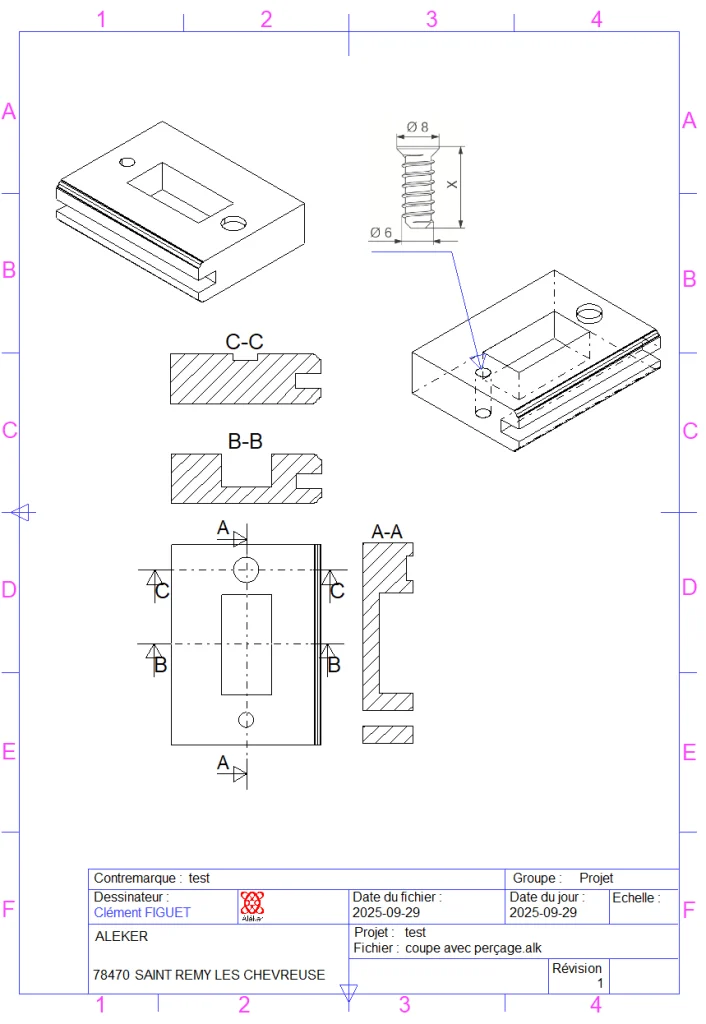
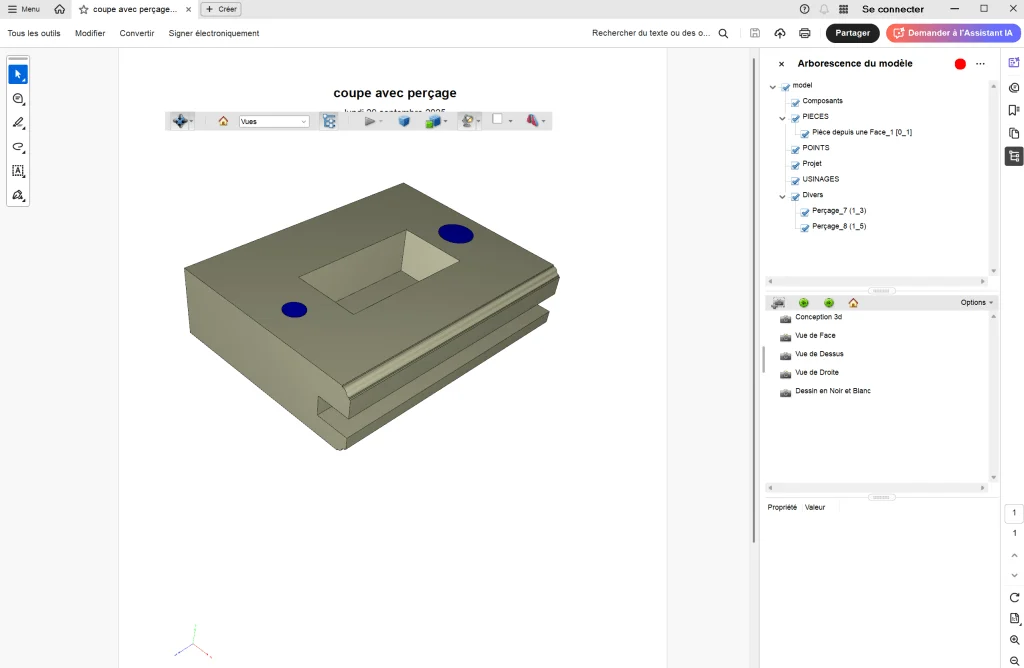
Section of a 3D object with routing and drilling PDF export with 3D view and CAD tree structure
12/09/2025 Version 12/09/2025
Fixes
Displaying edges on 3D parts stops the software if the user has not clicked the photo view first.
08/06/2025 Version 08/06/2025
Improvements
In drawing sheets:
Drawing objects can be moved and resized with the mouse.
A projected 3D view is available from the four main viewpoints.
A scale factor can be applied to each 3D view.
Each folded section can be moved on the sheet.
Photorealistic view:
The dimensions of the photorealistic view are calculated from the dimensions of the software photo view window.
Fixes
PDF export does not export dimensions.
12/04/2025 Version 12/04/2025
Fixes
The cut list sorting button is now correctly initialized.
Dimension arrows disappeared in drawing sheets.
Fixed dimension movement: only the text moved instead of the whole dimension during refresh.
Improvements
Updated sorting icons for the cut list in the ribbon Cut lists tab.
Added export to the Biesse B_OPTI cutting optimization software.
Moved the report template to private/Configuration.
Added two user preferences: invert zoom action and propagate group name during 3D copy/paste.
11/04/2025 Version 11/04/2025
Fixes
Fixed apostrophe issue when a name is used for the manufacturing folder.
Added a 2D export icon that shifted all icons in the ribbon.
Group name was not propagated correctly during 3D copy/paste.
Print preview no longer works in 3D view.
Improvements
Added default text in report views depending on context when the user uses the "Add to manufacturing PDF folder" menu.
09/04/2025 Version 09/04/2025
Fixes
Incorrect initialization of image lists for folders.
Thumbnail saved in a temporary alk file when the user clicks Save.
User folder path preferences were ignored by the explorer.
Fixed OpenGL window resizing while creating automatic manufacturing folders.
3D export.
The customer logo in BMP format is now visible in the properties box.
Demo mode limitation was reinforced.
Improvements
Added export to the free online optimization software.
Added a button to copy the current folder in the CAD explorer.
Automatic loading of a default thumbnail for .alk files to speed up preview of 2D and 3D model components.
30/03/2025 Version 30/03/2025
Fixes
Export to Homag woodWOP native MPR format was incorrect for horizontal holes on X+/X-, Y+/Y- edges.
Reintegrated the IsZAxisMirrored feature in CAM export.
Improvements
Forced update of the cost_detail database when generating a part report from the production view.
Optimization: avoids cost_detail updates when the production tab is not visible.
Added a button to open a folder directly from the software explorer.
Updated the production tree context menu and added a button to launch CadReportViewer.exe.
Removed unused context menus and obsolete advanced settings from the ribbon.
Improved handling of special cases in CNC export.
Added individual control of 2D dimension text height for custom interior fitting and woodworking project drawing sheets.
Changed production menu behavior when outsourced through the separate Aleker CadReportViewer.exe software.
The CAD explorer for files and folders now reacts to Windows Explorer events such as rename, creation and deletion.
23/03/2025 Version 23/03/2025
Fixes
Sensitivity was too low on small parts because of incorrect face detection.
Selecting a row in the production tree could display a random object.
Creating a part from a face could fail for beginners unless the mouse moved slightly after selecting the base part. Face detection is now performed automatically as soon as the base part is selected.
Improvements
Changed the message displayed in the lower status bar instead of the upper help bar.
Added ProductionView with its tree and removed the previous view.
22/03/2025 Version 22/03/2025
Fixes
Fixed incorrect ZDir coordinate conversion in some CAM exports, including ALPHACAM.INI.
Fixed: hinges with fixed X position did not work.
Fixed: OpenGL captures were too large during automatic reports, causing the alk database to grow.
Additions
Added information text for 3D copy/paste operations in the replay bar.
Improvements
Increased OpenGL bitmap size for manufacturing report screen captures, adapted to the template ratio.
Removals
Removed name display in the status bar in DEBUG mode.
Removed the table of contents from report views.
20/03/2025 Version 20/03/2025
Fixes
Fixed: added an offset for drawer slide dimensions, matching the real supplier difference.
Fixed: incorrect dimension orientation in Part plan.
Fixed: saved thumbnail was not visible because the cache was not invalidated.
Fixed: crash while creating thumbnails if a document was already open.
Additions
Added an image cache manager for thumbnails such as alk, dwg, dxf and similar files.
19/03/2025 Version 19/03/2025
Fixes
Fixed: 3D .gif images in reports were misinterpreted during report creation; replaced with .bmp.
Fixed: double-clicking in the file list could trigger a crash by calling a base class with an unknown object.
Additions
Added a temporary button in the ribbon to launch CadReportViewer.
18/03/2025 Version 18/03/2025
Fixes
Fixed: during 3D copy/paste, makeBox properties did not synchronize correctly with the selected part.
Fixed: group name was incorrectly propagated in 3D copy/paste when it was not selected at the right moment.
Fixed: groups are displayed in layoutTreeCtrl only when at least one 3D part is visible.
Additions
Added: PDF export and update from the CadReportViewer tree menu.
Improvements
Improved: font size in grids, better suited to 17-inch screens.
Reorganized 3D copy/paste classes to better manage pasted component updates.
Child components display correctly after a 3D copy/paste operation.
16/03/2025 Version 16/03/2025
Improvements
Added a context menu for the tree view in CadReportViewer.
Simplified text display in the tree view through rdlx.
15/03/2025 Version 15/03/2025
Additions
Added: in the manufacturing folder editor, ability to search for a page from alk data and automatically disable an item without children.
Fixes
Fixed: the component tree after 3D copy/paste is now correctly initialized.
18/01/2025 Version 18/01/2025
Additions
Added the first version of the new drawing sheet module.
New features
Ability to synchronize selection in the 3D view and the design tree to quickly find a 3D drawing object. Can be disabled from the 3D design tree context menu.
Ability to synchronize selection in the 2D view and the design tree to quickly find a 2D drawing object. Can be disabled from the drawing sheet tree context menu.
Opening an Aleker file (*.alk) can be done from the software explorer through a new button.
2024
2 entries
24/03/2024 Version 24/03/2024
Fixes
Fixed: the manufacturing view is not up to date when parts are created in an array, such as symmetry or directional array.
Improvements
Drawing sheets: added possible linear dimensioning and line. Moving a view is possible. Data is not saved.
14/02/2024 Version 14/02/2024
Additions
Added export in native CIX format for BiesseWorks and BSolid.
Added management of angled drilling and drilling on inclined edges in CIX.
2023
4 entries
20/04/2023 Version 20/04/2023
Additions
Added an option for export to cutting optimization software, allowing the project name to be added as the folder name.
Fixes
Fixed: the automatic manufacturing folder for dimensioned plans in A4 landscape format no longer generates an additional blank sheet.
01/02/2023 Version 01/02/2023
Additions
Added export to Opticoupe 6 in the list of cutting optimization software.
Improvements
Modernized the presentation of the manufacturing folder.
30/01/2023 Version 30/01/2023
Fixes
Fixed: when creating a very tall part (> 5 m) with a very slight angle relative to the main faces of the base volume, the parallelism calculation reached the angular tolerance limit and generated the unusual message "Can't find coincident faces". The tolerance was increased to remove this error in extreme cases.
21/01/2023 Version 21/01/2023
Fixes
Fixed: when exporting cut lists to Excel, the Subtract thicknesses checkbox was not taken into account.
Polyrey textures: fixed texture paths in the price file, affecting the photo view.
2022
2 entries
18/12/2022 Version 18/12/2022
Fixes
Fixed: during license renewal, if the key is not present, it is then impossible to renew the license. A Renew button is added in the dialog box.
18/01/2022 Version 18/01/2022
Fixes
Fixed behavior of the generic machining block "Slide". The second drilling counted the value named "Start" twice. The expected behavior is now used: the second drilling is positioned at the "Start" value plus "Drilling No. 1" (example: if "Start" is 37 mm and "Drilling No. 1" is 32 mm, then the first drilling is at 37 mm and the second at 69 mm).
Fixed: cumulative cut lists from several Aleker files are available again.
2021
6 entries
30/12/2021 Version 30/12/2021
Fixes
Fixed: BSOLID export for vertical drilling on the counterface is incorrect.
New features
New feature: the code value to send to Aleker in the dialog box used to update the protection key is reset after failure and forces generation of a new code.
22/12/2021 Version 22/12/2021
Fixes
Fixed: after disabling an item in the manufacturing list, the context menu is inaccessible for reactivating this item.
15/12/2021 Version 15/12/2021
Fixes
Fixed: variables no longer appear when opening an existing file.
10/12/2021 Version 10/12/2021
New features
New feature: updating the manufacturing folder is configurable with a dialog box for choosing which data or drawings should be updated.
New feature: photorealistic rendering, available only to Aleker customers.
Fixes
Fixed: updating the names for Designer, Project and Reference updates the manufacturing folder.
18/11/2021 Version 18/11/2021
Fixes
Fixed: an additional blank page is printed in the manufacturing folder.
New features
New feature: the rear view can now be added to the Plan view. It cannot be combined with the right view at the same time.
04/10/2021 Version 04/10/2021
Fixes
Fixed: the Designer name is remembered after being changed in Preferences.
Fixed: object colors in 3D exports were lightened.
Fixed: enabling shadows on untextured objects works.
New features
New feature: the Designer name can be changed for each project in the document properties. See the General tab at the same level as the Project name or Reference.
2020
4 entries
30/12/2020 Version 30/12/2020
New features
New feature: the hinge machining macro is no longer limited to system 32.
New feature: a minimum spacing can be defined for universal assembly and universal hinge, to get an adaptive quantity according to cabinet depth.
New universal assembly macro: added several new parameters.
Fixes
Hinge macro fix: quantity is calculated according to weight or height ranges of the door.
28/12/2020 Version 28/12/2020
New features
New feature: machining macro values can be saved as presets.
New feature: toolpaths can be forced clockwise or counterclockwise.
New feature: an arrow systematically indicates toolpath orientation.
Fixes
Fixed: the CNC tool list is editable again so a diameter and tool type can be entered.
Fixed: defining a tool number on a machining operation is exported to CAM software.
26/12/2020 Version 26/12/2020
Fixes
Fixed: machining macros are available again.
Fixed: over-thickness values can be updated from the interface through the properties of the material selected on a part.
08/12/2020 Version 08/12/2020
Improvements
Improved export for cutting optimizations.
The software version is now displayed in the title bar.
Fixes
Fixed: when exporting optimization files in text format, edge band thickness cut lists are not visible for Opticoupe.
Fixed: the software name appears in the title bar when the window is maximized.
Fixed Biesse BSolid DXF export for vertical drilling. Import into BSolid must be done with "Technological DXF import".
Fixed handling of the CNC export folder.
Installation
How to install a new version without losing your data
1 Rename the C:\Aleker folder to C:\Aleker.old.
2 Download and install the latest setup using the link you received.
3 From your backup location [C:\Aleker.old\Designer\private\bin\], copy the Designer.Settings.xml file containing your preferences to the new installation [C:\Aleker\Designer\private\bin\]. This file contains your company name, address, descriptions, access paths, preference values and related settings.