Skip to content

Article

7 good reasons to choose Aleker Designer

Discover why Aleker Designer is a practical 3D CAD choice for professional woodworkers, fitters and custom furniture makers.

Illustration for 7 good reasons to choose Aleker Designer

Presentation of Aleker

Aleker Designer is a professional CAD workflow for woodworkers and interior fitters who need to move from a customer idea to workshop-ready documents without rebuilding the same project several times.

Why computer-aided design matters

A workshop gains time when the drawing, dimensions, materials, cut lists and manufacturing documents stay connected. CAD is not only a presentation tool; it becomes the backbone of preparation.
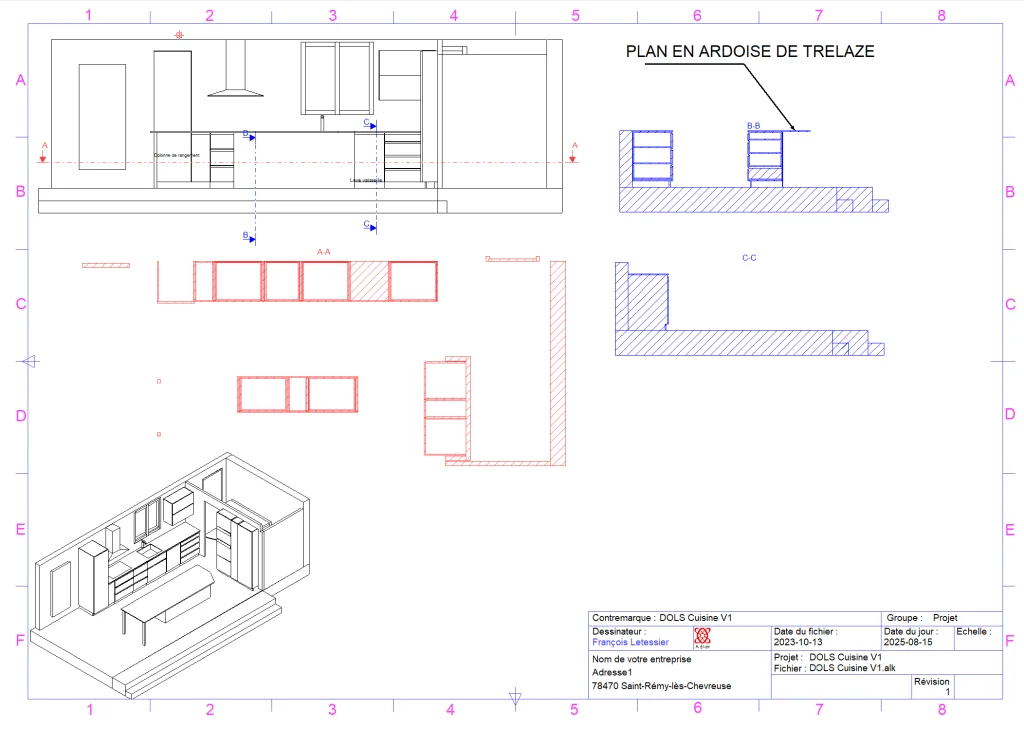
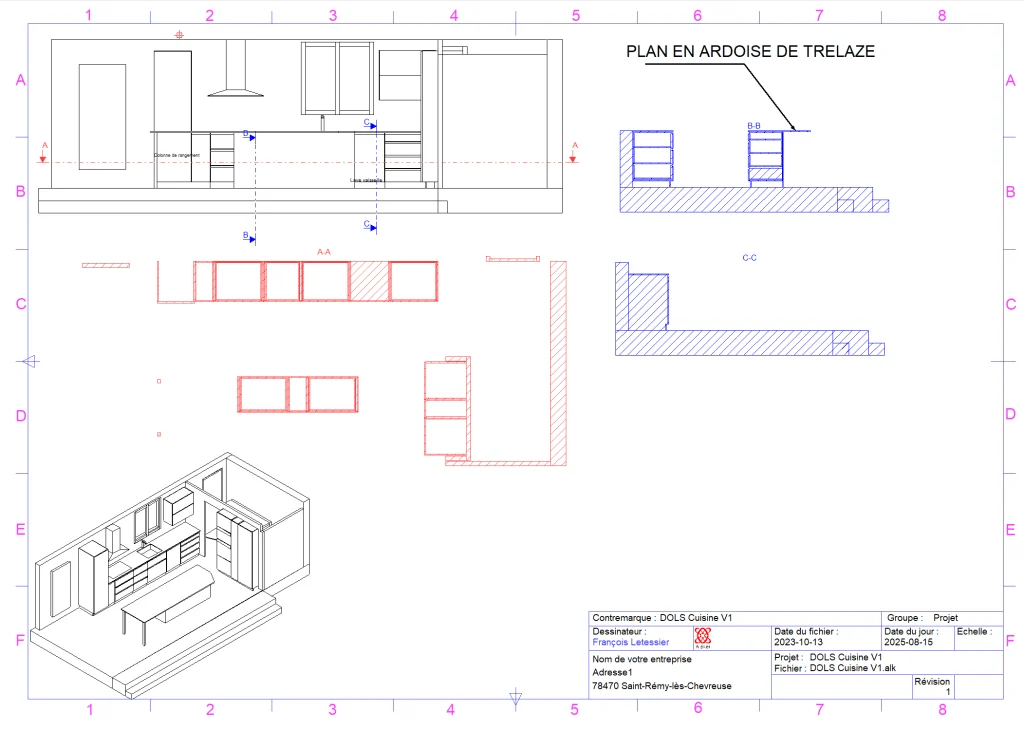
7 good reasons to choose Aleker Designer: drawing technique 2d kitchen en 3d 1 1

Reason 1: a complete woodworking software
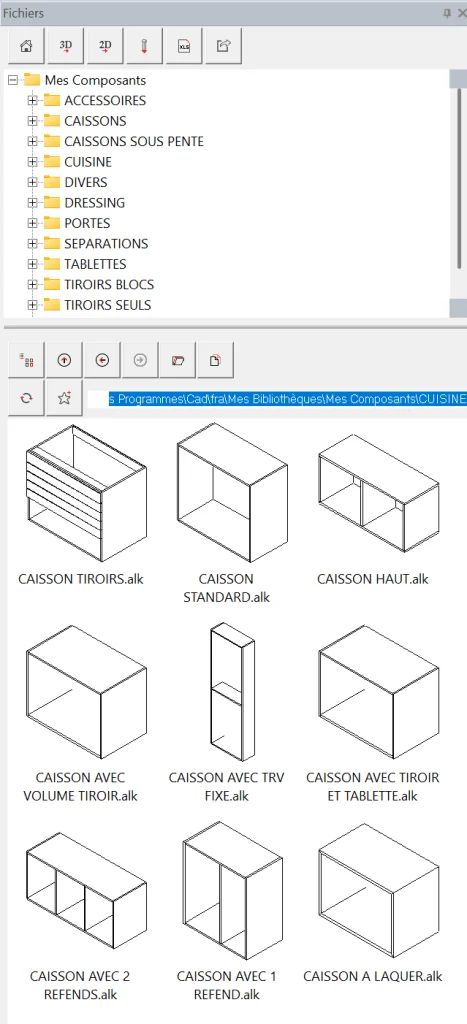
7 good reasons to choose Aleker Designer: library de caissons et composants divers 1

Aleker brings together 3D modelling, 2D drawings, dimensions, cut lists, costing data and manufacturing files in one trade-focused environment.
7 good reasons to choose Aleker Designer: drawing technique 2d kitchen en 3d 1 1

Reason 2: a simple and accessible workflow
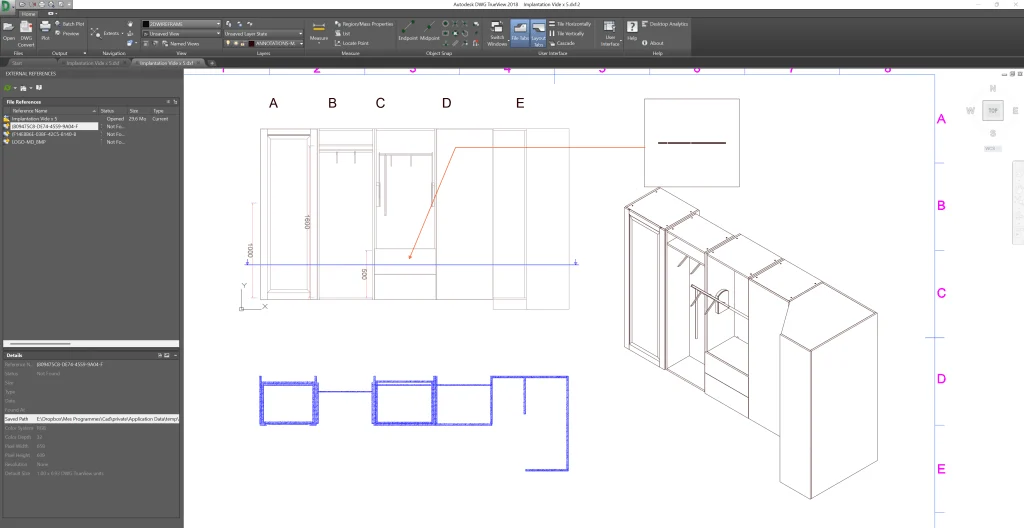
7 good reasons to choose Aleker Designer: export aleker designer vers autocad 1

The objective is to keep the software understandable for daily production. The main tools remain close to the user, so a professional can draw, modify and check a project without fighting the interface.

Basic, adapted and efficient tools

  • Draw volumes and assemblies in 3D.
  • Edit dimensions and production properties.
  • Generate readable documents for customers and the workshop.

Reason 3: designed for wood professionals

General 3D software can be useful, but woodworking needs specific logic: materials, grain direction, panels, edges, hardware, machining, assemblies and manufacturing constraints.

Specific needs for woodworkers and fitters

Aleker keeps the project close to the way a workshop thinks: parts, groups, modules, drawings and production data are prepared together.

Almost unlimited custom design

Custom furniture rarely fits inside a standard cabinet logic. Aleker lets you handle unusual shapes, bespoke dimensions and mixed projects while keeping technical control.

Custom interior fitting

For retail, offices, restaurants, libraries, kitchens or bathrooms, the software helps present the project and prepare fabrication from the same model.

Reason 4: fast onboarding

A practical tool must be learned without blocking production for months. Aleker is supported by training and field experience, so the user can progress on real projects.

Quick and intuitive use

Reusable components, clear parameters and direct visual feedback help the user understand what changes in the project.

Reason 5: full customization of projects and quotes

Each workshop has its own methods, prices, margins and preferred suppliers. Aleker lets the professional build a working environment that reflects that reality.

Manage prices and margins freely

Costing is more reliable when the project structure already contains materials, dimensions and production information.

Build a custom catalogue

Libraries become more valuable over time: each reusable element reduces re-entry and makes future designs faster.

Reason 6: compatible with workshop tools

A CAD tool should not isolate the workshop. Aleker supports useful outputs for drawings, exchange formats, CNC-oriented workflows and production preparation.

Wide compatibility with trade formats

PDF, DXF, DWG, IGES, GLB and CNC-related exports help connect the design office with the rest of the production chain.

A smoother production workflow

The same model can feed customer validation, technical drawings, cut lists and workshop documents, reducing errors caused by retyping data.

Reason 7: satisfied customers

A good software choice is also a question of support, continuity and trust. Aleker has been used for years by woodworking and fitting professionals.

Dedicated assistance

Human support matters when projects are specific. Training, advice and follow-up help users get value from the software in real workshop situations.

Conclusion

Aleker Designer is relevant when a professional wants a complete, flexible and trade-specific CAD workflow, from first drawing to manufacturing preparation.

Summary of the seven reasons

  • Complete woodworking workflow.
  • Accessible interface.
  • Designed for professionals of wood and interior fitting.
  • Fast onboarding.
  • Custom libraries and costing.
  • Compatibility with workshop tools.
  • Support and customer satisfaction.

Decision guide

The seven reasons all point to the same issue: continuity

Choosing woodworking CAD software is not only about the quality of the 3D image. The decisive point is whether the same project can move from the first idea to drawings, cut lists, pricing and manufacturing without losing information at each step.

The 3D model must remain useful after the sales conversation, not become a dead-end presentation file.
Workshop documents should reuse the data already created during design.
Libraries must adapt to the company method instead of forcing a standard catalogue.
Training should help the workshop build a repeatable method, not just learn isolated commands.

Workshop impact

What to check before changing software

Before adopting a new tool, a workshop should test it on a real project: a usual cabinet, an awkward under-slope unit, a customer change, a drawing sheet and a cut list. This reveals very quickly whether the software is compatible with daily production.

Can dimensions be changed late without rebuilding the whole project?
Can the same component be reused with different materials or proportions?
Are drawings readable enough for customers, fitters and workshop teams?
Can exported data be used by optimisation software, CAM software or CNC machines when needed?
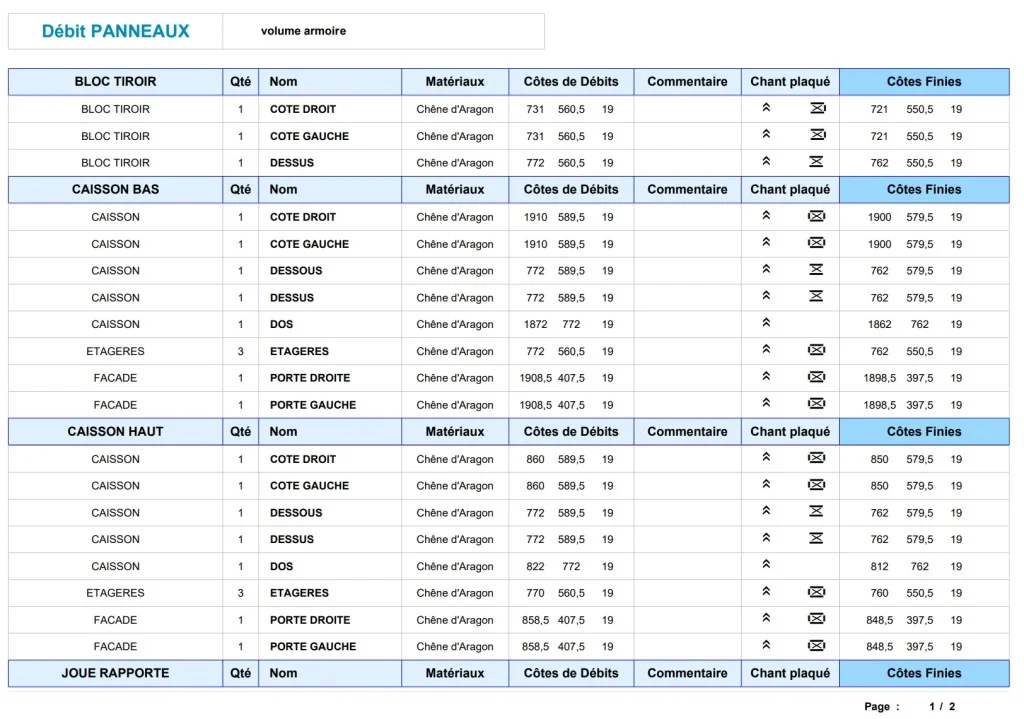
Cut list generated from a woodworking CAD project
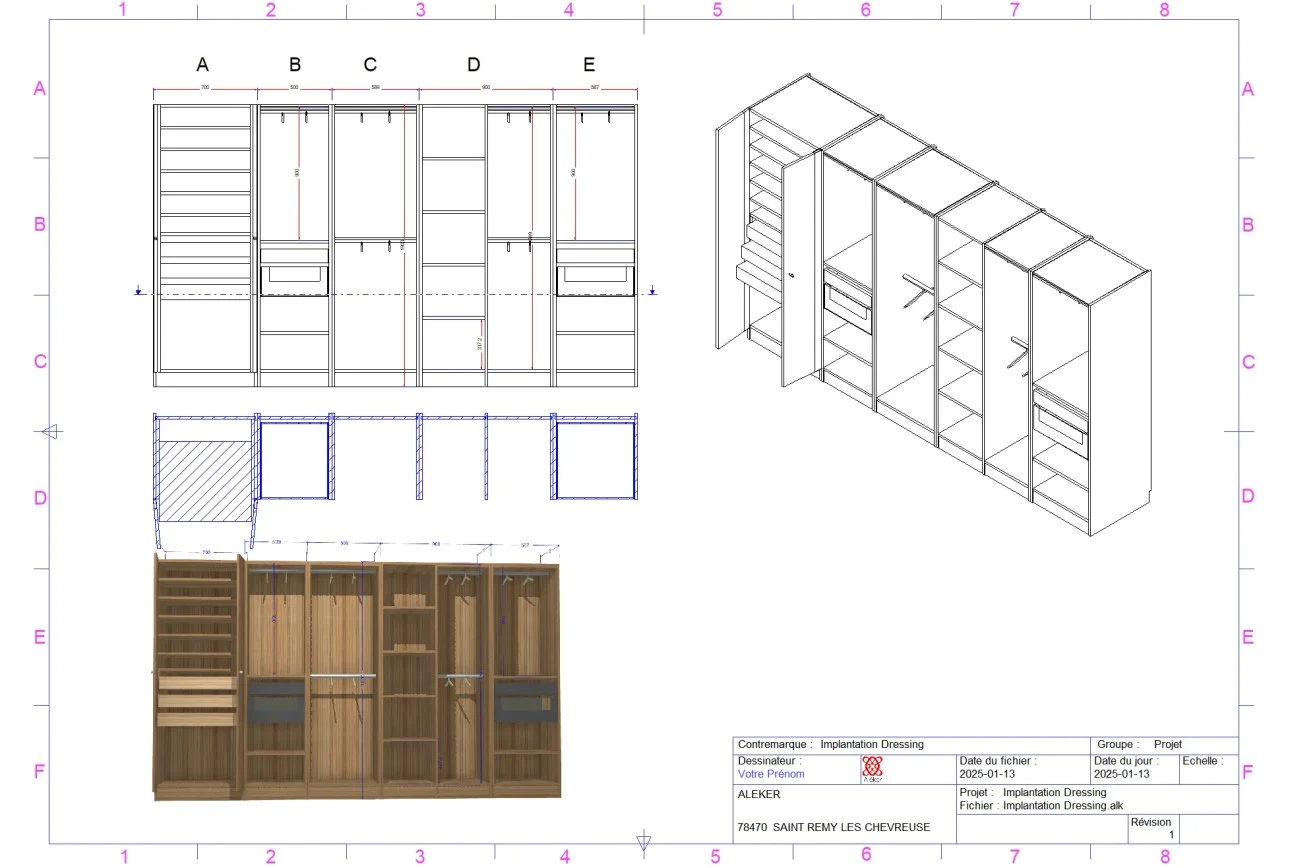
Dressing drawing generated from the 3D model

From tool to method

A good CAD choice becomes a repeatable workshop method

The real gain appears when the same habits are repeated from one project to the next: naming conventions, material families, component libraries, drawing templates, pricing data and export checks. That method is what turns software into daily leverage.

Define which documents are mandatory before a project leaves the design office.
Identify recurring furniture families that should become reusable components.
Prepare training around the company workflow instead of generic examples only.
Measure time saved on revisions, not only on the first drawing.

Workshop checklist

How to evaluate this topic in your own workflow

Whatever the project type, the practical question is always the same: can the drawing become useful workshop information without starting again in another file? Use this checklist to connect the article to your own production method, your current documents and the constraints that usually create delays between customer approval and manufacturing.

Choose one recent project that represents your daily constraints, not an idealized demo case, and check how dimensions, materials and customer changes would be handled.
List the outputs you need after validation: customer view, drawing sheet, cut list, cost breakdown, PDF file, optimisation export, CNC data or a complete manufacturing file.
Check which components should become reusable library elements for future projects, including their materials, hardware, names, variables and production properties.
Identify the points where your current workflow requires re-entry, manual checking or duplicated documents, then verify whether a connected CAD workflow removes that friction.
Compare the information needed by each person involved: customer, designer, workshop, installer, subcontractor and machine operator.
Use the demo to test one change late in the project, because revision handling often reveals whether the workflow is genuinely suited to custom work.
Check how the project will be archived after delivery, because reusable references, reliable drawings and clear production data are what make the next similar project faster.
Evaluate the learning curve against the recurring value: a method that saves time on every revision, drawing sheet and cut list matters more than a fast first impression.

Want to see Aleker on your own projects?

A free demo is the fastest way to evaluate the workflow with your real workshop needs.

Request a demo